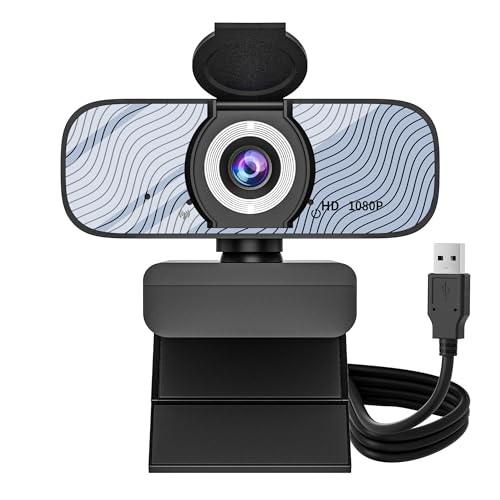
Kreo Owl Full HD 1080P 60 FPS Webcam, Black

Price:3134.05
MRP:5000
37
%Off
Check Your Exact Savings on Amazon
Continue to Amazon
Good PriceBelow average.
Current
3,134
Lowest₹2,000
Typical₹3,664
Highest₹4,699
- To upgrade your video conferencing and streaming experience with superior audio and video quality compared to built-in laptop or desktop cameras.
- Smooth 1080P at 60 FPS: Elevate your video quality to the next level with 1080P at a silky-smooth 60 frames per second. Whether you're in a fast-paced online game, hosting a live stream, or engaged in a business meeting, this webcam delivers exceptional clarity and fluidity, ensuring your every movement is captured in lifelike detail for an immersive experience
- Auto-Focus Precision: This webcam takes the guesswork out of staying sharp. With advanced auto-focus technology, it continuously tracks and adjusts, so you'll always appear crisp and in focus, whether you're in a meeting or creating content, ensuring your every detail is captured with precision
- Expansive 78-Degree Distortion-Free View: Enjoy a wider perspective without distortion or fisheye effects. This webcam's 78-degree field of view ensures you can fit more into your frame without sacrificing image quality for group calls, presentations, and streaming
- Enhanced Sound Clarity with Dual Digital Mic: Enjoy crystal-clear audio in every conversation. This webcam features dual digital microphones equipped with advanced background noise suppression technology, ensuring your voice takes center stage without distractions for seamless video calls, streaming, and content creation
- Enhanced Privacy with Built-In Shutter: Safeguard your personal space effortlessly. This webcam boasts a built-in privacy shutter, allowing you to cover the lens when not in use, ensuring your privacy is always protected and giving you control of your online presence
- Plug and Play Compatibility: Simple setup with no additional drivers required. Connect the webcam via USB and start using it immediately with your favorite video conferencing platforms, streaming software, and content creation applications across Windows and Mac operating systems
- 360-Degree Rotation Capability: Flexible positioning with full 360-degree rotation allows you to adjust the webcam angle to capture the best view. Mount it on your monitor, laptop, or tripod and rotate it to find the optimal angle for your video calls and recordings
- Smooth 1080P at 60 FPS: Elevate your video quality to the next level with 1080P at a silky-smooth 60 frames per second. Whether you're in a fast-paced online game, hosting a live stream, or engaged in a business meeting, this webcam delivers exceptional clarity and fluidity, ensuring your every movement is captured in lifelike detail for an immersive experience
- Auto-Focus Precision: This webcam takes the guesswork out of staying sharp. With advanced auto-focus technology, it continuously tracks and adjusts, so you'll always appear crisp and in focus, whether you're in a meeting or creating content, ensuring your every detail is captured with precision
- Expansive 78-Degree Distortion-Free View: Enjoy a wider perspective without distortion or fisheye effects. This webcam's 78-degree field of view ensures you can fit more into your frame without sacrificing image quality for group calls, presentations, and streaming
- Enhanced Sound Clarity with Dual Digital Mic: Enjoy crystal-clear audio in every conversation. This webcam features dual digital microphones equipped with advanced background noise suppression technology, ensuring your voice takes center stage without distractions for seamless video calls, streaming, and content creation
- Enhanced Privacy with Built-In Shutter: Safeguard your personal space effortlessly. This webcam boasts a built-in privacy shutter, allowing you to cover the lens when not in use, ensuring your privacy is always protected and giving you control of your online presence
- Plug and Play Compatibility: Simple setup with no additional drivers required. Connect the webcam via USB and start using it immediately with your favorite video conferencing platforms, streaming software, and content creation applications across Windows and Mac operating systems
- 360-Degree Rotation Capability: Flexible positioning with full 360-degree rotation allows you to adjust the webcam angle to capture the best view. Mount it on your monitor, laptop, or tripod and rotate it to find the optimal angle for your video calls and recordings