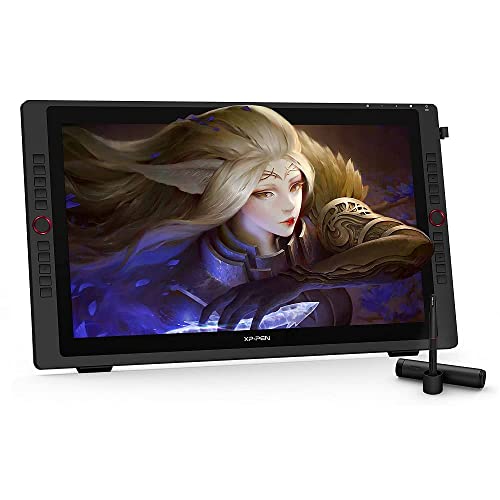
XP-Pen Magic Drawing Pad 12.2 Inch Standalone Drawing Tablet with 16384 Pressure Levels X3 Pro Battery-Free Pencil Paper-Like Screen 8GB + 256GB Portable for Digital Drawing Graphic Artists

Price:44999
MRP:79990
44
%Off
Check Your Exact Savings on Amazon
Continue to Amazon
Great DealNear record low.
Current
44,999
Lowest₹44,999
Typical₹50,013
Highest₹79,954
- ✅ [True Standalone Drawing Tablet — No PC Needed]: Create anytime, anywhere with a full standalone setup. Sketch, paint, take notes, and work on your ideas directly on the Magic Drawing Pad, no laptop, cables, or extra gear required. Perfect for classes, commutes, cafés, and client meetings when you want a clean, distraction free workflow.
- ✅ [Industry-First 16K Pressure Sensitivity with X3 Pro Slim Stylus] : The Magic Drawing Pad introduces the X3 Pro Slim Stylus with 16,384 pressure levels, delivering 100% higher sensitivity than standard tablets. Enjoy ultra-precise strokes, smoother line transitions, 60° tilt recognition, and a natural feel — all without charging or pairing. Perfect for sketching, illustration, shading, and professional digital art.
- ✅ [12.2” Paper-Like Full-Color Display] : Features a 12.2-inch AG nano-etched screen with 2160×1440 resolution, 3:2 aspect ratio, 115% sRGB wide color gamut, and 16.77M colors. Enjoy a true pen-on-paper experience with rich color accuracy for drawing, designing, visual notes, and creative projects.
- ✅ [Eye-Comfort Certified — Create for Hours Easily] : The display is TÜV Rheinland certified and includes a 10-layer soft light treatment that reduces reflections, glare, and eye strain. Designed for long drawing sessions, study hours, editing work, and screen-intensive tasks.
- ✅ [DP IN Mode — Full PC Software, Pro Workflow]: Switch to DP IN to use the Magic Drawing Pad as a pen display for your computer. This lets professionals work inside advanced desktop software (the kind studios and agencies use) while still drawing directly on the Pad, ideal for heavy files, plug-ins, shortcuts, and a complete production workflow.
- ✅ [Android 14 Tablet with Full Creative Ecosystem] : Runs on Android 14, giving you access to Google Play apps for art, design, learning, and productivity. Includes a 3-month membership for Clip Studio Paint and ibis Paint X upon activation — ideal for beginner to advanced artists.
- ✅ [Powerful Hardware for Smooth Performance] : Equipped with 8GB RAM and 256GB storage (expandable up to 1TB). Features a 13MP rear camera and 8MP front camera to capture references, scan artwork, or attend online sessions. Handles multitasking and drawing apps with ease.
- ✅ [8000 mAh All-Day Battery Life] : The high-capacity 8000 mAh battery provides up to 13 hours of continuous use — perfect for outdoor sketching, travel, university, or long workdays. Create anywhere without worrying about charging.
- ✅ [Ultra-Portable, Slim & Lightweight] : At just 6.9 mm thick and 599 g, the Magic Drawing Pad is designed for mobility. Slim, light, and easy to carry — ideal for students, artists, and professionals on the move.
- ✅ [Multimedia, Productivity & Dual-Window Multitasking] : Beyond drawing, enjoy e-books, videos, music, photography, and gaming. Supports dual-window mode, allowing you to draw while referencing tutorials, PDFs, or research material side-by-side.
- ✅ [True Standalone Drawing Tablet — No PC Needed]: Create anytime, anywhere with a full standalone setup. Sketch, paint, take notes, and work on your ideas directly on the Magic Drawing Pad, no laptop, cables, or extra gear required. Perfect for classes, commutes, cafés, and client meetings when you want a clean, distraction free workflow.
- ✅ [Industry-First 16K Pressure Sensitivity with X3 Pro Slim Stylus] : The Magic Drawing Pad introduces the X3 Pro Slim Stylus with 16,384 pressure levels, delivering 100% higher sensitivity than standard tablets. Enjoy ultra-precise strokes, smoother line transitions, 60° tilt recognition, and a natural feel — all without charging or pairing. Perfect for sketching, illustration, shading, and professional digital art.
- ✅ [12.2” Paper-Like Full-Color Display] : Features a 12.2-inch AG nano-etched screen with 2160×1440 resolution, 3:2 aspect ratio, 115% sRGB wide color gamut, and 16.77M colors. Enjoy a true pen-on-paper experience with rich color accuracy for drawing, designing, visual notes, and creative projects.
- ✅ [Eye-Comfort Certified — Create for Hours Easily] : The display is TÜV Rheinland certified and includes a 10-layer soft light treatment that reduces reflections, glare, and eye strain. Designed for long drawing sessions, study hours, editing work, and screen-intensive tasks.
- ✅ [DP IN Mode — Full PC Software, Pro Workflow]: Switch to DP IN to use the Magic Drawing Pad as a pen display for your computer. This lets professionals work inside advanced desktop software (the kind studios and agencies use) while still drawing directly on the Pad, ideal for heavy files, plug-ins, shortcuts, and a complete production workflow.
- ✅ [Android 14 Tablet with Full Creative Ecosystem] : Runs on Android 14, giving you access to Google Play apps for art, design, learning, and productivity. Includes a 3-month membership for Clip Studio Paint and ibis Paint X upon activation — ideal for beginner to advanced artists.
- ✅ [Powerful Hardware for Smooth Performance] : Equipped with 8GB RAM and 256GB storage (expandable up to 1TB). Features a 13MP rear camera and 8MP front camera to capture references, scan artwork, or attend online sessions. Handles multitasking and drawing apps with ease.
- ✅ [8000 mAh All-Day Battery Life] : The high-capacity 8000 mAh battery provides up to 13 hours of continuous use — perfect for outdoor sketching, travel, university, or long workdays. Create anywhere without worrying about charging.
- ✅ [Ultra-Portable, Slim & Lightweight] : At just 6.9 mm thick and 599 g, the Magic Drawing Pad is designed for mobility. Slim, light, and easy to carry — ideal for students, artists, and professionals on the move.
- ✅ [Multimedia, Productivity & Dual-Window Multitasking] : Beyond drawing, enjoy e-books, videos, music, photography, and gaming. Supports dual-window mode, allowing you to draw while referencing tutorials, PDFs, or research material side-by-side.